Predictive Maintenance and Teleassistance: how to connect Mect PLCs to the Cloud
by MectPredictive maintenance and teleservice are two key aspects in Industry 4.0 to reduce downtime and increase production efficiency. To achieve these goals, it is necessary to connect Mect PLCs (Programmable Logic Controllers) to the cloud so that they can send and receive data in real time. In this article, we will look at how to connect Mect PLCs to the cloud using Mect's Ethernet ports and panel protocols.
The Ethernet ports of the Mect panels.
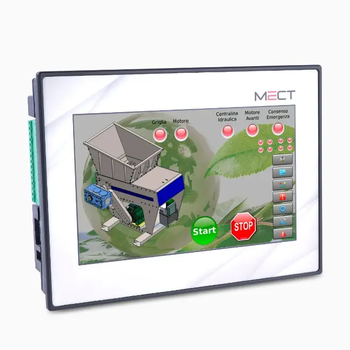
Mect panels, such as the TP1070, have Ethernet ports that allow them to be connected to a local area network or the Internet. The Ethernet port is a communication interface that uses the TCP/IP protocol to send and receive data. With this port, you can connect the Mect panel to a network router or switch, and then send data to the cloud.
Mect panel protocols
Mect panels support several communication protocols, including:
- Modbus RTU (Remote Terminal Unit)
- Modbus TCP (Transmission Control Protocol)
- TCPRTU (Transmission Control Protocol/Remote Terminal Unit)
- CANopen (Controller Area Network open)
These protocols allow data to be sent and received between the Mect panel and other devices in the network, such as sensors or actuators. In particular, the Modbus TCP protocol is commonly used to send data to the cloud, as it allows the Internet network to be used as a transport medium.
How to send data to the cloud
To send data to the cloud, it is necessary to use a cloud computing service that supports the Modbus TCP protocol. Some examples of cloud computing services that support the Modbus TCP protocol are:
- AWS IoT (Amazon Web Services Internet of Things)
- Microsoft Azure IoT
- Google Cloud IoT Core
Once the most suitable cloud computing service has been identified, it is necessary to proceed with the configuration of the Mect panel. This is done using the Mect Suite software, which allows the panel to be parameterized for data transmission to cloud platforms or to applications installed within the same network as the panel, such as SCADA systems or other supervisory and control software compatible with the Modbus TCP protocol.
Example of configuration
Here is an example of how to configure the Mect TP1070 panel to send data to the cloud using the Modbus TCP protocol:
- Configure the IP address of the Mect TP1070 panel (via the library page) to use the Ethernet port and Modbus TCP protocol.
- Configure the cloud computing service to receive data from the Mect panel.
- Use the Mect Suite software for defining, creating and configuring the variables/records to be exchanged, enabling structured data delivery from the Mect panel to the cloud .
Conclusions
In this article, we looked at how to connect Mect PLCs to the cloud using Ethernet ports and Mect panel protocols. Predictive maintenance and remote maintenance are two key aspects in Industry 4.0, and connecting Mect PLCs to the cloud is an important step in achieving these goals. Thanks to the Ethernet port and protocols of Mect panels, data can be sent to the cloud and information can be received in real time. Mect Suite software allows you to configure the Mect panel and send data, making it easier and faster to connect Mect PLCs.
Mect Products
- TP1070: operator panel with PLC and Ethernet port
- Mect Suite: software for configuration and sending data to the cloud
- sMily: remote connection and monitoring service
Cloud computing services
- AWS IoT (Amazon Web Services Internet of Things)
- Microsoft Azure IoT
- Google Cloud IoT Core
Contact us
For more information about connecting Mect PLCs to the cloud, contact us at our website or phone number. We are available to help you achieve your predictive maintenance and telehealth goals.